What PaceBoss can and can't tell you
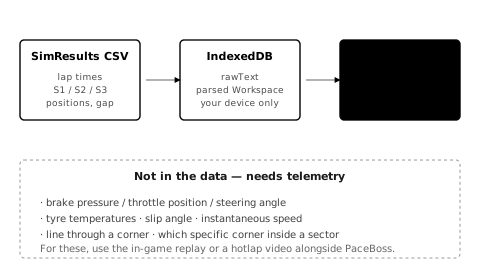
PaceBoss is built on a single data source: the SimResults CSV export of an Assetto Corsa Competizione race or qualifying session. There is no telemetry. The CSV is exhaustively, only, the following:
- Per-lap totals: lap time, validity flag (whether the lap counted or was thrown out for a track-limits cut), lap number.
- Per-sector totals: S1, S2, S3 split times for each lap.
- Session-level metadata: track, session type (Race / Qualifying / Practice), date, server, weather (sometimes), class names.
- Per-driver / entry: car number, model, class, team, finish position, gap to leader, best lap, consistency percentage (when SimResults publishes one).
Every claim PaceBoss makes about your driving is computed from those bullets. If a claim can't reduce to that input, PaceBoss can't make it.
What PaceBoss can show you
The full inventory lives in dedicated pages:
- Pace bands explained — how sector deltas are coloured and what the thresholds mean
- Consistency in racing — the formula and what the percentage feels like in practice
- Theoretical best lap, explained — the sum-of-sector-bests ceiling and when it lies
The short version: PaceBoss can show you which sector is bleeding time, by how much, and whether it's structural across most laps or a one-off. Everything it can compute reduces to lap times, sector totals, and the metadata in a SimResults CSV. If a claim can't reduce to those inputs, PaceBoss can't make it.
What PaceBoss can't tell you
Anything that requires telemetry, which is anything that needs sub-lap-level visibility:
- Brake pressure — was your braking input firm or feathered? Trail-braking aggressively or releasing too early? Not visible.
- Throttle position — corner exit timing, mid-corner throttle modulation, whether you're rolling on or stabbing. Not visible.
- Steering angle and rate — single-arc steering versus sawing the wheel, peak lock used, smoothness of input. Not visible.
- Speed at any point in the lap — entry speed into a corner, minimum corner speed, exit speed onto a straight. PaceBoss only sees the time the sector took, not the speed trace inside it.
- Where in a sector the time was lost — S2 might be 0.4s slow because of one corner, two corners, your line through a sweeper, or your exit speed onto the back straight. The sector total is necessary but not sufficient evidence.
- Specific corner identification — "Eau Rouge cost you 0.3s" is something a hotlap-comparison telemetry tool can say. PaceBoss can't.
- Tyre temperatures, pressures, wear, fuel load — the things that move with stint length and setup. Not visible.
- Gear, RPM, ABS engagement, traction-control intervention — input-side telemetry. Not visible.
- Car attitude — slip angle, understeer vs oversteer, weight transfer. Not visible.
- Setup specifics — ARB, diff, brake bias, camber. Not in the CSV.
If a claim about your driving requires any of these, PaceBoss can't make it — and any guide that says "PaceBoss shows you trail braking" is being loose with words. The honest version is "PaceBoss shows you S1 is slow; trail braking is one common reason S1 is slow on entry-heavy sectors; verifying is the next step."
How to bridge the gap
PaceBoss tells you which sector and how much. To know what's happening within the sector — which corner, which input, which mistake — you have three sources:
- The in-game replay. ACC's replay tool is the closest you'll get to telemetry on console. Replay your slow lap with the camera bound to a fast ghost; the visual gap shows up as you fall behind through the slow sector. The TC (traction control) and ABS indicators on the in-car HUD also help — frequent activation flags input issues. On PC, the in-game Pirelli HUD provides brake/throttle traces; on console, the standard HUD shows brake and throttle bars in real time.
- Hotlap videos. Driver61, Empty Box, and Coach Dave Academy publish ACC hotlaps with overlays. Watching their inputs through the same sector tells you what an alien is doing differently. See get faster from hotlap videos for the right way to study them — copying inputs doesn't work.
- Expert consensus. Real-world racing has a hundred years of textbooks and coach interviews on what "fast" looks like in any given corner type. Ross Bentley's Speed Secrets series, Mark Donohue's The Unfair Advantage, and the Skip Barber racing-school methodology cover the techniques in depth. The Going faster guides on this site cite them where they apply to ACC.
The combination — PaceBoss for where, replay for what, expert priors for why — is the workflow. None of the three alone is enough.
Why this matters for the rest of these guides
The Going faster guides on this site each follow the same data-honest structure:
- What the technique is — definitional, with at least one authoritative external citation.
- Why it makes you faster — physics or pedagogy, citation-backed.
- What PaceBoss can show you — exhaustively listed against the data scope above. Honest about what it can't.
- What you do with that PaceBoss reading — the workflow, which usually pivots to in-game replay or hotlap video at the point where telemetry would otherwise take over.
- Common ACC examples — how the technique manifests in ACC specifically.
- Further reading — books, channels, schools.
Read with this in mind: every "PaceBoss tells you X" claim in those guides is reducible to lap time / sector total / consistency / gap / theoretical best. Anything more specific is expert priors with a citation, and the guide says so plainly.
Related reading
- How PaceBoss works — the tool walkthrough, view by view.
- Find your pace deficit — the canonical "diagnose, then localise" workflow.
- Get faster from hotlap videos — the localisation step PaceBoss can't do for you.
questions
- Does PaceBoss have telemetry data?
- No. PaceBoss reads SimResults CSV exports, which contain per-lap totals and per-sector splits. Telemetry — brake pressure, throttle position, steering angle, speed trace — is not in the CSV and not visible to PaceBoss.
- Can PaceBoss tell me which corner I am losing time in?
- No. PaceBoss can tell you which sector is slow and whether the deficit is structural or a one-off. Localising to a specific corner within the sector requires the in-game replay or a hotlap video.